Role
Designed the authoring structure, implemented the tool windows, and tied data mapping and runtime behavior into one editable workflow.
A Unity authoring environment for digital-twin style workflows, built around nine EditorWindow tools and an operating structure that reduced repeated manual setup for non-developer teams.
Designed the authoring structure, implemented the tool windows, and tied data mapping and runtime behavior into one editable workflow.
Teams were paying repeated cost whenever content structure, mapping, and validation had to be rebuilt manually.
Created an editor environment with consistent windows, reusable mapping rules, and a runtime path that non-developer teams could actually use.
This is strong proof of tooling ownership: not just runtime development, but reducing operational friction for the people who maintain the content.
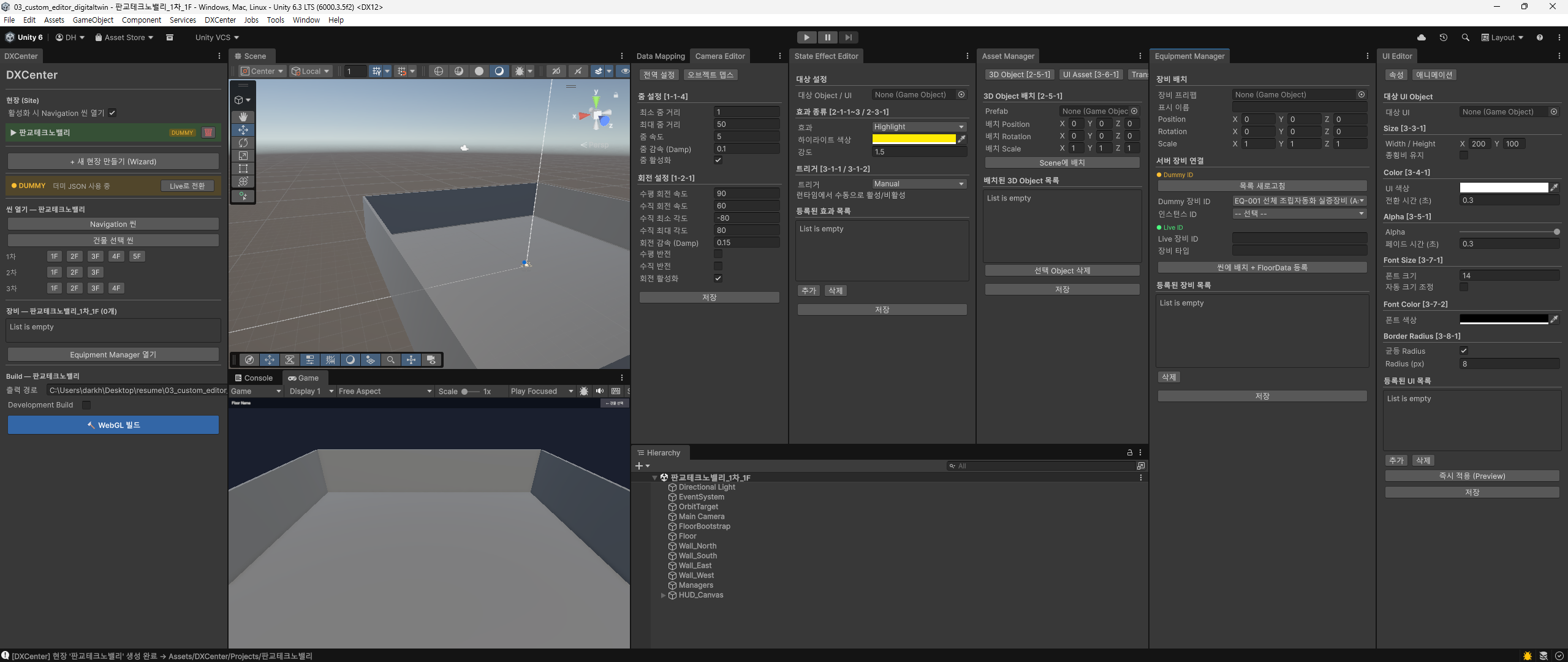
The value of DXCenter is not just the number of windows. It is the fact that those windows formalize how data, endpoints, topics, and UI mapping move through the authoring flow.
The result is a system where repeated setup work becomes a tool-guided process instead of a fragile manual chain. That is the difference between a one-off editor and a real production tool.